ColdBox8, Modern Template, CommandBox 6.2, BoxLang 1.8

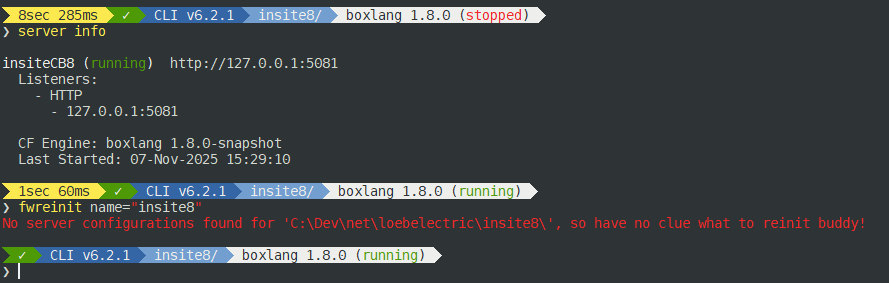
Playing around with ‘the ocho’ CB8, BoxLang 1.8.0 and from the command line in CommandBox v6.2.1, fwreinit returns:

No server configurations found for ‘PATH_TO_SITE’, so have no clue what to reinit buddy!

Is this a bug, or does BoxLang require something different? btw, coldbox reinit returns the same thing.

From the browser, it seems to work fine.

what does “from the command line in CommandBox v6.2.1, fwreinit returns:” mean?

@gknight It seems like the command box serverService is having trouble discovering your server when you run the fwreinit command. Can you try this and let us know the results:

Look in your server.json file and get the name of the server, usually at the top "name":"my-boxlang-server" then try running:

fwreinit name="my-boxlang-server"
(with your server name of course :wink:)

Let us know the results

It’s interesting that bullet train obviously recognizes the server in that folder. I wonder what logic Luis is using in the reinit command to find the server.

@bdw429s reinit.cfc is using serverService.getServerInfoByDiscovery( getCWD(), arguments.name );

Seems to be this

Is the current directory the web root of the server?

What do you see if you run

server info

Does that command find the server?


server info returns what you would expect.

fwreinit name=“my_server_name” returns the same results.

The modern template produces the same results using boxlang 1.7.

But that’s not the name of the server. Your server info command said the name was insitecb8 but you ran name="inside8.

You also never answered this question:

Sorry, the current directory is the web root of the server.

And you are right, I had mismatched names. After correcting that, the fwreinit name="insitecb8" works, but the standalone fwreinit still throws the error.

Is your server.json file named server.json ?

Can you post the contents?
(leaving out any sensitive data if any of course!)

Weird, you’d have to step through the logic in the server service and find out where it breaks down. commandbox/src/cfml/system/services/ServerService.cfc at development · Ortus-Solutions/commandbox · GitHub

Since there’s no name, it would eventually be winding up here commandbox/src/cfml/system/services/ServerService.cfc at development · Ortus-Solutions/commandbox · GitHub

which literally just loops over all the servers, looking for one whose webroot matches the incoming path. Just slap some debugging in and find out what’s going on. You can edit the ServerService.cfc directly in the CommandBox home. Use systemOutput( data, true ) to debug and reload the shell between changes

Apologies for the late response:

{
    "name":"insitecb8",
    "JVM":{
        "heapSize":"512",
        "javaVersion":"openjdk21_jre",
        "args":"-agentlib:jdwp=transport=dt_socket,server=y,suspend=n,address=8888"
    },
    "app":{
        "cfengine":"boxlang@1"
    },
    "web":{
        "webroot":"public",
        "http":{
            "port":"5081"
        },
        "rewrites":{
            "enable":true
        },
        "aliases":{
            "/coldbox/system/exceptions":"./lib/coldbox/system/exceptions/",
            "/tests":"./tests/"
        }
    },
    "cfconfig":{
        "file":"./.cfconfig.json"
    },
    "scripts":{
        "onServerInstall":"install bx-esapi,bx-compat-cfml --noSave"
    }
}

The only thing I changed was the name, added a port and bx-compat-cfml to the scripts.

So earlier, I asked if the current directory is the web root of the server and you said yes, but your server.json above says otherwise :slight_smile:

   "webroot":"public",

That would explain the issue, and it’s the reason it’s the first question I asked!

Commands like server info use a more generic/robust approach to finding the current server, which is one that looks for a server whose server.json lives in the current directory

		var serverDetails = serverService.resolveServerDetails( arguments );

This is why the reinit command doesn’t find the server as it uses a more limited approach which only works if the current working directory of the CLI is EXACTLY the web root. Your web root is nested one folder deeper in the public directory, thus it’s not found.

Gotcha —I guess I didn’t fully understand what you were asking me or how the modern template differs from the flat template.

Thank you for the explanation.

No worries. More importantly, @lmajano do you now know what you need to change to make the reinit command work in this scenario?

1 Like